---
title: User roles and permissions
description: Learn about the permissions and restrictions for each user role in Breadstack.
---
[Skip to content](https://helpcentre.breadstack.com/user-roles-and-permissions#main-content)
[](https://breadstack.com)
Open main navigation
Close main navigation
- [Sign in to Breadstack](https://bs.app.breadstack.io/login)
[Sign in to Breadstack](https://bs.app.breadstack.io/login)
How can we help you?
- There are no suggestions because the search field is empty.
1. [Breadstack Help Centre](https://helpcentre.breadstack.com/?hsLang=en-ca)
2. [Settings module](https://helpcentre.breadstack.com/settings-module?hsLang=en-ca)
3. [Team](https://helpcentre.breadstack.com/settings-module?hsLang=en-ca#team)
# User roles and permissions
## Learn about the permissions and restrictions for each Breadstack user role.
When you [invite team members](https://helpcentre.breadstack.com/adding-a-new-user?hsLang=en-ca) to your Breadstack workspace, you can ensure they're only able to access operations and information relevant to their role.
Note that this article pertains to users of Breadstack's Online Store, Service, and Settings modules.
Breadstack Delivery has a separate system for managing users and [drivers](https://helpcentre.breadstack.com/adding-a-driver?hsLang=en-ca).
You can customize any of the below roles (with the exception of Admin) to add or remove access to modules, features, and locations. Click on a role to learn its default permissions.
- [Admin](https://helpcentre.breadstack.com/user-roles-and-permissions#admin)
- [General manager](https://helpcentre.breadstack.com/user-roles-and-permissions#general-manager)
- [Online store manager](https://helpcentre.breadstack.com/user-roles-and-permissions#store-manager)
- [Online store agent](https://helpcentre.breadstack.com/user-roles-and-permissions#store-agent)
- [Service manager](https://helpcentre.breadstack.com/user-roles-and-permissions#service-manager)
- [Service agent](https://helpcentre.breadstack.com/user-roles-and-permissions#service-agent)
- [Custom role](https://helpcentre.breadstack.com/user-roles-and-permissions#custom-role)
#### Editing permissions or store locations for existing users
If you (as an Admin) want to adjust permissions or location access for a user already active in your workspace, visit **Users**, click on their name, and check or uncheck permissions/locations as desired.
Note that you cannot adjust permissions or locations for other Admin users.
### Admin
Check the **Admin** box if you would like to grant this user full access to all modules and features, including Settings, for all store locations.
Note that Admin are the *only* users who can access Settings. This means they alone can perform operations such as inviting additional team members, managing integrations, and editing product categories.

### General manager
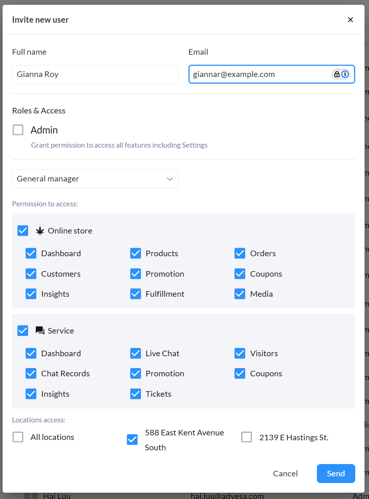
General Managers can access all modules except for Settings. You may choose to restrict their access to one or more locations, or grant them access to all locations.
### Online store manager
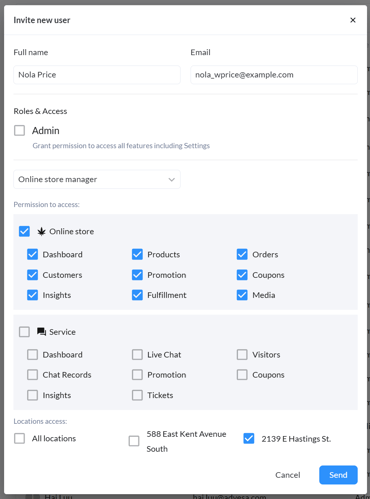
Online store managers can access all features in the Online Store module. They cannot access the Service or Settings modules.
You may choose to restrict their access to one or more locations, or grant them access to all locations.
### Online store agent
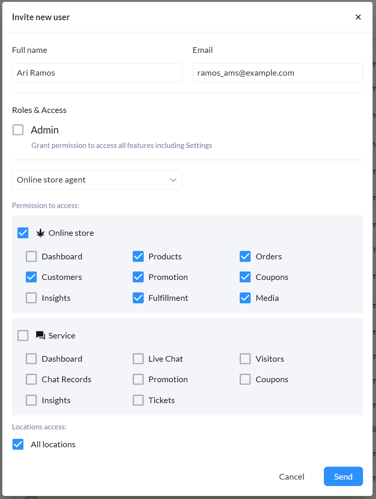
Online store agents can access all features in the Online Store module *except *for Dashboard and Insights.
You may choose to restrict their access to one or more locations, or grant them access to all locations.
### Service manager
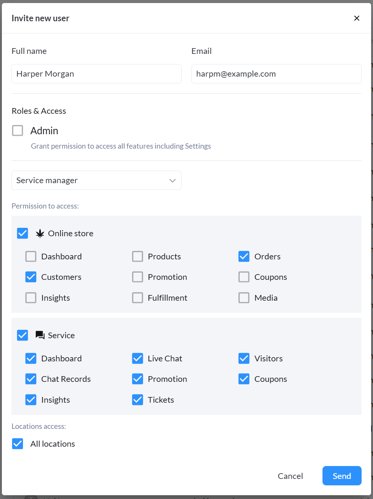
Service managers can access all features in the Service module. In the Online Store module, they have access to Customers and Orders. They cannot access Settings.
You may choose to restrict their access to one or more locations, or grant them access to all locations.
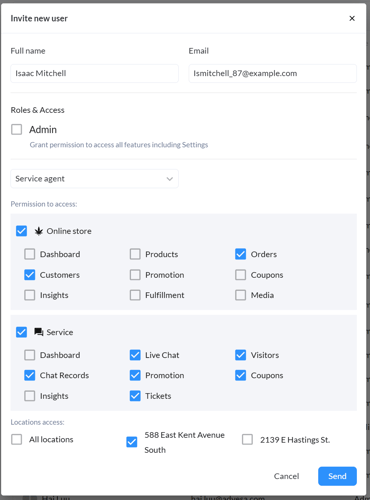
### Service agent
Service agents can access all features in the Service module, *except* for Dashboard and Analytics. In the Online Store module, they have access to Customers and Orders. They cannot access Settings.
In the Sales screen of the Service module, they can view (but not edit) promotions and coupons.
You may choose to restrict their access to one or more locations, or grant them access to all locations.
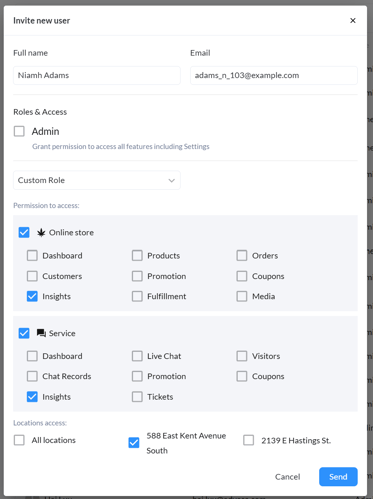
### Custom role
Customize the modules, features, and locations a team member can access. Note that you *cannot* create a Custom role with access to Settings; only Admin users have access to that module.
- [Getting started](https://helpcentre.breadstack.com/getting-started?hsLang=en-ca)
- [Online Store module](https://helpcentre.breadstack.com/online-store-module?hsLang=en-ca#main-content)
- [Promotions](https://helpcentre.breadstack.com/online-store-module?hsLang=en-ca#promotions)
- [Orders](https://helpcentre.breadstack.com/online-store-module?hsLang=en-ca#orders)
- [Products](https://helpcentre.breadstack.com/online-store-module?hsLang=en-ca#products)
- [Insights](https://helpcentre.breadstack.com/online-store-module?hsLang=en-ca#insights)
- [Service module](https://helpcentre.breadstack.com/service-module?hsLang=en-ca#main-content)
- [Service](https://helpcentre.breadstack.com/service-module?hsLang=en-ca#service)
- [Settings module](https://helpcentre.breadstack.com/settings-module?hsLang=en-ca#main-content)
- [Data](https://helpcentre.breadstack.com/settings-module?hsLang=en-ca#data)
- [Channels](https://helpcentre.breadstack.com/settings-module?hsLang=en-ca#channels)
- [Team](https://helpcentre.breadstack.com/settings-module?hsLang=en-ca#team)
- [Operation](https://helpcentre.breadstack.com/settings-module?hsLang=en-ca#operation)
- [Breadstack Delivery (CanFleet)](https://helpcentre.breadstack.com/breadstack-delivery-canfleet?hsLang=en-ca#main-content)
- [Breadstack Delivery module](https://helpcentre.breadstack.com/breadstack-delivery-canfleet?hsLang=en-ca#breadstack-delivery-module)
- [CanFleet Driver App](https://helpcentre.breadstack.com/breadstack-delivery-canfleet?hsLang=en-ca#canfleet-driver-app)
- [Breadstack OMS App](https://helpcentre.breadstack.com/breadstack-oms-app?hsLang=en-ca)
- [Integrations](https://helpcentre.breadstack.com/integrations?hsLang=en-ca#main-content)
- [Integrating a payment provider](https://helpcentre.breadstack.com/integrations?hsLang=en-ca#integrating-a-payment-provider)
- [Integrating a shipping or delivery partner](https://helpcentre.breadstack.com/integrations?hsLang=en-ca#integrating-a-shipping-or-delivery-partner)
- [Website editing guides](https://helpcentre.breadstack.com/website-editing-guides?hsLang=en-ca)
[](http://breadstack.com)
[mailto:email@email.com](mailto:email@email.com)
Copyright © 2026, Breadstack