---
title: Setting up offline auto-responses in the chat widget
description: Learn how to create an offline messaging flow to help customers who start chats outside your service hours.
---
[Skip to content](https://helpcentre.breadstack.com/offline-auto-responses-chat-widget#main-content)
[](https://breadstack.com)
Open main navigation
Close main navigation
- [Sign in to Breadstack](https://bs.app.breadstack.io/login)
[Sign in to Breadstack](https://bs.app.breadstack.io/login)
How can we help you?
- There are no suggestions because the search field is empty.
1. [Breadstack Help Centre](https://helpcentre.breadstack.com/?hsLang=en-ca)
2. [Settings module](https://helpcentre.breadstack.com/settings-module?hsLang=en-ca)
3. [Channels](https://helpcentre.breadstack.com/settings-module?hsLang=en-ca#channels)
# Setting up offline auto-responses in the chat widget
## Customize the messaging your chat widget displays outside of service hours.
If you've [set up chat service hours](https://helpcentre.breadstack.com/adjusting-live-chat-service-hours?hsLang=en-ca), you can create auto-responses to help guide customers who message you when your team is offline.
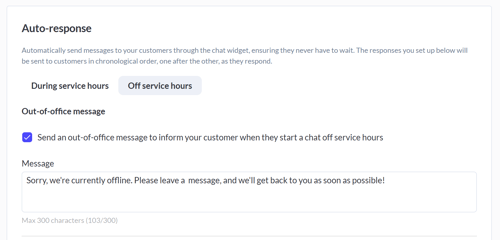
In **Settings > Chat Widget**, you can set up the following messaging flow for customers who try to start a chat during your offline hours:
1. **Out-of-office message (optional)** - After the customer starts the chat (by entering their required details and selecting a department) this message will appear automatically. It's an opportunity to let the customer know your team is currently offline and set expectations about when you will follow up.
2. **Leave-a-message form** - Choose whether to require customers to leave a message (requiring a message means the customer cannot start a new chat until they have submitted their message).
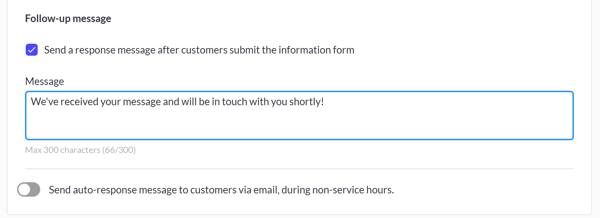
3. **Follow-up message (optional)** - This generates automatically after the customer submits their message. You can also choose to have this message to go to the email address the customer provided.
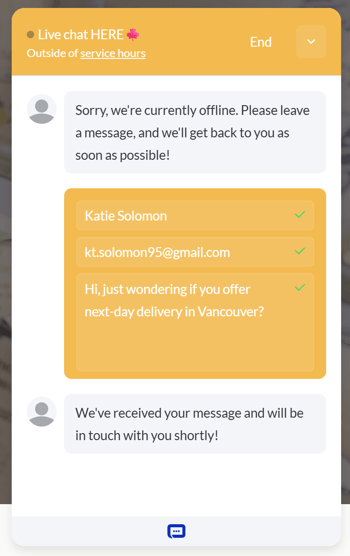
Below, you can see an example of how this messaging flow appears to customers in the chat widget.
Learn how to [follow up on a missed chat](https://helpcentre.breadstack.com/following-up-on-a-missed-chat?hsLang=en-ca).
- [Getting started](https://helpcentre.breadstack.com/getting-started?hsLang=en-ca)
- [Online Store module](https://helpcentre.breadstack.com/online-store-module?hsLang=en-ca#main-content)
- [Promotions](https://helpcentre.breadstack.com/online-store-module?hsLang=en-ca#promotions)
- [Orders](https://helpcentre.breadstack.com/online-store-module?hsLang=en-ca#orders)
- [Products](https://helpcentre.breadstack.com/online-store-module?hsLang=en-ca#products)
- [Insights](https://helpcentre.breadstack.com/online-store-module?hsLang=en-ca#insights)
- [Service module](https://helpcentre.breadstack.com/service-module?hsLang=en-ca#main-content)
- [Service](https://helpcentre.breadstack.com/service-module?hsLang=en-ca#service)
- [Settings module](https://helpcentre.breadstack.com/settings-module?hsLang=en-ca#main-content)
- [Data](https://helpcentre.breadstack.com/settings-module?hsLang=en-ca#data)
- [Channels](https://helpcentre.breadstack.com/settings-module?hsLang=en-ca#channels)
- [Team](https://helpcentre.breadstack.com/settings-module?hsLang=en-ca#team)
- [Operation](https://helpcentre.breadstack.com/settings-module?hsLang=en-ca#operation)
- [Breadstack Delivery (CanFleet)](https://helpcentre.breadstack.com/breadstack-delivery-canfleet?hsLang=en-ca#main-content)
- [Breadstack Delivery module](https://helpcentre.breadstack.com/breadstack-delivery-canfleet?hsLang=en-ca#breadstack-delivery-module)
- [CanFleet Driver App](https://helpcentre.breadstack.com/breadstack-delivery-canfleet?hsLang=en-ca#canfleet-driver-app)
- [Breadstack OMS App](https://helpcentre.breadstack.com/breadstack-oms-app?hsLang=en-ca)
- [Integrations](https://helpcentre.breadstack.com/integrations?hsLang=en-ca#main-content)
- [Integrating a payment provider](https://helpcentre.breadstack.com/integrations?hsLang=en-ca#integrating-a-payment-provider)
- [Integrating a shipping or delivery partner](https://helpcentre.breadstack.com/integrations?hsLang=en-ca#integrating-a-shipping-or-delivery-partner)
- [Website editing guides](https://helpcentre.breadstack.com/website-editing-guides?hsLang=en-ca)
[](http://breadstack.com)
[mailto:email@email.com](mailto:email@email.com)
Copyright © 2026, Breadstack