---
title: Integrating Breadstack with Payfirma/Merrco
description: A step-by-step guide to connecting your Breadstack store to Payfirma/Merrco. This integration lets your customers pay by credit card online.
---
[Skip to content](https://helpcentre.breadstack.com/integrating-breadstack-with-payfirma/merrco#main-content)
[](https://breadstack.com)
Open main navigation
Close main navigation
- [Sign in to Breadstack](https://bs.app.breadstack.io/login)
[Sign in to Breadstack](https://bs.app.breadstack.io/login)
How can we help you?
- There are no suggestions because the search field is empty.
1. [Breadstack Help Centre](https://helpcentre.breadstack.com/?hsLang=en-ca)
2. [Integrations](https://helpcentre.breadstack.com/integrations?hsLang=en-ca)
3. [Integrating a payment provider](https://helpcentre.breadstack.com/integrations?hsLang=en-ca#integrating-a-payment-provider)
# Integrating Breadstack with Payfirma/Merrco
## Connecting your Breadstack store to Payfirma/Merrco lets customers pay by credit card online. Here's how to connect.
Connect Payfirma/Merrco to your store in Breadstack to allow customers to pay safely and securely by credit card. This guide will take you through setting up the integration.
Step 1: In your WooCommerce store admin environment
1. Go to **Plugins** and install the latest version of the *Breadstack Credit Card Payment Gateway (Payfirma) v2* plugin for your store.
2. Navigate to **WooCommerce Settings > Payment**. You should now see Payfirma/Merrco listed as a payment option. Click **Manage ** to open it.
3. You'll see a number of options here. To ensure Payfirma/Merrco is functional on your website, you must:
1. Click the **Enable** checkbox.
2. Input the **BS API Key**. This will be provided by Breadstack Customer Support.
1. 1. (Optional) Customize the **Title** and **Description** that customers see at checkout.
### Step 2: In your Payfirma/Merrco account
This step is performed in Payfirma. Please note that screens and labels may be subject to change.
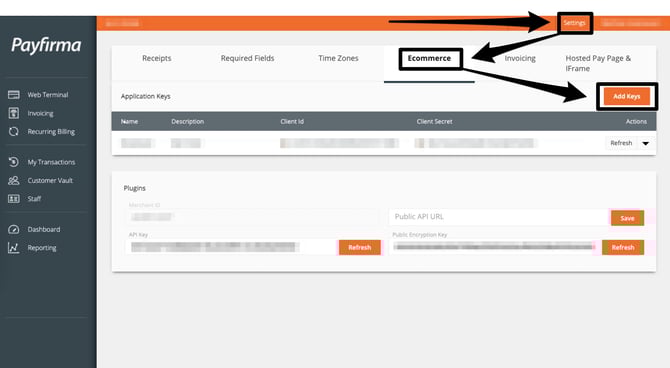
Note down three credentials (you'll need them for the next step): your **Client ID, Client Secret**, and **Public Encryption Key**.
You can find these by signing into PayHQ, then navigating to **Settings > eCommerce**. Click **Add Keys**, give the key a name, and click **Save**. This will generate all three credentials.
### Step 3: In your Breadstack workspace
1. Go to **Settings > Integrations**. Find and select **Payfirma/Merrco** to open the integration page.
2. Under Connections, click **Connect to a location**. This will open a popup.
Select the store location you wish to connect, then provide your Client ID and Client secret
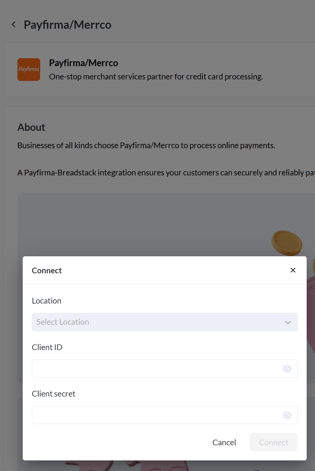
3. Click **Connect**. If the integration was successful, Payfirma/Merrco will show as "Enabled" for your store.
If you see an error message, first double check that your credentials are free of typos, and that the *Breadstack Credit Card Payment Gateway (Payfirma) v2* plugin is enabled in WooCommerce.
### Update or turn off your Payfirma/Merrco integration
You can edit your integration in **Settings > Integrations > Payfirma/Merrco**. Click the three dots next to the store connection you wish to edit.
This will open a menu where you can:
- **Edit connection** - Update your Client ID, Client Secret, or Public Encryption Key, should they change;
- **Disable connection** - Turn off Payfirma/Merrco as a payment method without losing the credentials you saved;
- **Delete connection** - Remove the integration permanently, along with any stored credentials.
- [Getting started](https://helpcentre.breadstack.com/getting-started?hsLang=en-ca)
- [Online Store module](https://helpcentre.breadstack.com/online-store-module?hsLang=en-ca#main-content)
- [Promotions](https://helpcentre.breadstack.com/online-store-module?hsLang=en-ca#promotions)
- [Orders](https://helpcentre.breadstack.com/online-store-module?hsLang=en-ca#orders)
- [Products](https://helpcentre.breadstack.com/online-store-module?hsLang=en-ca#products)
- [Insights](https://helpcentre.breadstack.com/online-store-module?hsLang=en-ca#insights)
- [Service module](https://helpcentre.breadstack.com/service-module?hsLang=en-ca#main-content)
- [Service](https://helpcentre.breadstack.com/service-module?hsLang=en-ca#service)
- [Settings module](https://helpcentre.breadstack.com/settings-module?hsLang=en-ca#main-content)
- [Data](https://helpcentre.breadstack.com/settings-module?hsLang=en-ca#data)
- [Channels](https://helpcentre.breadstack.com/settings-module?hsLang=en-ca#channels)
- [Team](https://helpcentre.breadstack.com/settings-module?hsLang=en-ca#team)
- [Operation](https://helpcentre.breadstack.com/settings-module?hsLang=en-ca#operation)
- [Breadstack Delivery (CanFleet)](https://helpcentre.breadstack.com/breadstack-delivery-canfleet?hsLang=en-ca#main-content)
- [Breadstack Delivery module](https://helpcentre.breadstack.com/breadstack-delivery-canfleet?hsLang=en-ca#breadstack-delivery-module)
- [CanFleet Driver App](https://helpcentre.breadstack.com/breadstack-delivery-canfleet?hsLang=en-ca#canfleet-driver-app)
- [Breadstack OMS App](https://helpcentre.breadstack.com/breadstack-oms-app?hsLang=en-ca)
- [Integrations](https://helpcentre.breadstack.com/integrations?hsLang=en-ca#main-content)
- [Integrating a payment provider](https://helpcentre.breadstack.com/integrations?hsLang=en-ca#integrating-a-payment-provider)
- [Integrating a shipping or delivery partner](https://helpcentre.breadstack.com/integrations?hsLang=en-ca#integrating-a-shipping-or-delivery-partner)
- [Website editing guides](https://helpcentre.breadstack.com/website-editing-guides?hsLang=en-ca)
[](http://breadstack.com)
[mailto:email@email.com](mailto:email@email.com)
Copyright © 2026, Breadstack