---
title: Following up on a missed or offline chat
description: Learn what to do if you missed a new chat from a customer, or if the chat was initiated during offline hours.
---
[Skip to content](https://helpcentre.breadstack.com/following-up-on-a-missed-chat#main-content)
[](https://breadstack.com)
Open main navigation
Close main navigation
- [Sign in to Breadstack](https://bs.app.breadstack.io/login)
[Sign in to Breadstack](https://bs.app.breadstack.io/login)
How can we help you?
- There are no suggestions because the search field is empty.
1. [Breadstack Help Centre](https://helpcentre.breadstack.com/?hsLang=en-ca)
2. [Service module](https://helpcentre.breadstack.com/service-module?hsLang=en-ca)
3. [Service](https://helpcentre.breadstack.com/service-module?hsLang=en-ca#service)
# Following up on a missed or offline chat
## If you missed a chat from a customer, you can follow up by email. Here's how to find and manage missed and offline chats.
A chat is "missed" if the customer clicks End Chat before an agent has sent a reply. "Offline" chats occur when the customer initiates a chat outside of your service hours.
### Finding missed chats
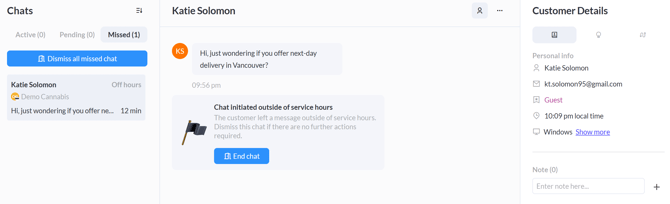
You can view all missed chats by navigating to **Service >** **Live Chat **and toggling the ribbon to **Missed**. Here, you'll see both missed and offline chats.
Alternatively, if you would like to search in a more targeted way, go to **Service > Chat Records** and scroll down to the **Missed **or **Offline** lists. Use the filters at the top of the page to set the time frame, department, customer type, and other criteria for your search.
From either screen, you can click on a missed chat to view:
- **The chat window **with the customer's initial message (if your channel has departments, this will show their department selection);
- **The customer information panel.** The level of detail you see here will depend on whether the customer is registered or a new or returning guest.
Here's an example of a missed chat screen from a Returning customer. The middle panel shows the chat, and the right-hand panel contains customer details.
### Following up on missed/offline chats
If you see a missed or offline chat, consider following up by email. The customer's email address (if collected) appears in the customer information panel, directly under the customer's name.
Note that you cannot send an email directly from Breadstack; you will need to use your store's email platform to send and receive emails.
If you email the customer, you can continue tracking the interaction in Breadstack by updating the customer's **Customer Notes** log. This way, if you or your teammates chat with this customer again in the future, everyone will know the outcome of the missed chat.
If you cannot take any further action related to the missed chat, click **Dismiss** in the chat screen to remove the chat from the list.
- [Getting started](https://helpcentre.breadstack.com/getting-started?hsLang=en-ca)
- [Online Store module](https://helpcentre.breadstack.com/online-store-module?hsLang=en-ca#main-content)
- [Promotions](https://helpcentre.breadstack.com/online-store-module?hsLang=en-ca#promotions)
- [Orders](https://helpcentre.breadstack.com/online-store-module?hsLang=en-ca#orders)
- [Products](https://helpcentre.breadstack.com/online-store-module?hsLang=en-ca#products)
- [Insights](https://helpcentre.breadstack.com/online-store-module?hsLang=en-ca#insights)
- [Service module](https://helpcentre.breadstack.com/service-module?hsLang=en-ca#main-content)
- [Service](https://helpcentre.breadstack.com/service-module?hsLang=en-ca#service)
- [Settings module](https://helpcentre.breadstack.com/settings-module?hsLang=en-ca#main-content)
- [Data](https://helpcentre.breadstack.com/settings-module?hsLang=en-ca#data)
- [Channels](https://helpcentre.breadstack.com/settings-module?hsLang=en-ca#channels)
- [Team](https://helpcentre.breadstack.com/settings-module?hsLang=en-ca#team)
- [Operation](https://helpcentre.breadstack.com/settings-module?hsLang=en-ca#operation)
- [Breadstack Delivery (CanFleet)](https://helpcentre.breadstack.com/breadstack-delivery-canfleet?hsLang=en-ca#main-content)
- [Breadstack Delivery module](https://helpcentre.breadstack.com/breadstack-delivery-canfleet?hsLang=en-ca#breadstack-delivery-module)
- [CanFleet Driver App](https://helpcentre.breadstack.com/breadstack-delivery-canfleet?hsLang=en-ca#canfleet-driver-app)
- [Breadstack OMS App](https://helpcentre.breadstack.com/breadstack-oms-app?hsLang=en-ca)
- [Integrations](https://helpcentre.breadstack.com/integrations?hsLang=en-ca#main-content)
- [Integrating a payment provider](https://helpcentre.breadstack.com/integrations?hsLang=en-ca#integrating-a-payment-provider)
- [Integrating a shipping or delivery partner](https://helpcentre.breadstack.com/integrations?hsLang=en-ca#integrating-a-shipping-or-delivery-partner)
- [Website editing guides](https://helpcentre.breadstack.com/website-editing-guides?hsLang=en-ca)
[](http://breadstack.com)
[mailto:email@email.com](mailto:email@email.com)
Copyright © 2026, Breadstack