---
title: Controlling how promotions combine
description: When multiple promotions are running, you can choose whether discounts stack (combine).
---
[Skip to content](https://helpcentre.breadstack.com/controlling-how-promotions-combine#main-content)
[](https://breadstack.com)
Open main navigation
Close main navigation
- [Sign in to Breadstack](https://bs.app.breadstack.io/login)
[Sign in to Breadstack](https://bs.app.breadstack.io/login)
How can we help you?
- There are no suggestions because the search field is empty.
1. [Breadstack Help Centre](https://helpcentre.breadstack.com/?hsLang=en-ca)
2. [Online Store module](https://helpcentre.breadstack.com/online-store-module?hsLang=en-ca)
3. [Promotions](https://helpcentre.breadstack.com/online-store-module?hsLang=en-ca#promotions)
# Controlling how promotions combine
## Manage what happens when products are subject to multiple discounts.
When a product is already discounted, you can choose whether a) new promotions apply on top of that discount (stack); or b) the customer receives one discount instead of the other.
To manage this, go to **Online Store **> **Promotions** and click **Settings** in the top bar.
If you would like promotions to stack on top of one another, toggle **Stacking **to **On**. Choose whether discounts should be Compounding or Cumulative:
- **Compounding **- This means that if a product has already been discounted, a new promotion will affect the discounted price.
*For example, a product costing $10.00 is reduced by 50% so that it now costs $5.00. A new promotion is introduced for 10% off. The final price of the product is $4.50.*
- **Cumulative** - This means that if a product has already been discounted, a new product will affect the original price.
*For example, a product costing $10.00 is reduced by 50% so that it now costs $5.00. A new promotion is introduced for 10% off. The final price of the product is $4.00.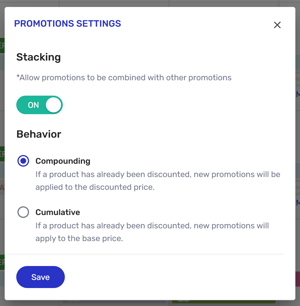*
If you don't want promotions to stack, and instead would prefer customers to receive one promotion *or* another, toggle **Stacking **to **Off**. You can now set the criteria for which discount customers receive:
- **Favour Customer** - If two or more promotions are running, the customer receives the one that grants the biggest discount.
- **Favour Store **- If two or more promotions are running, the customer receives the one that grants the smallest discount.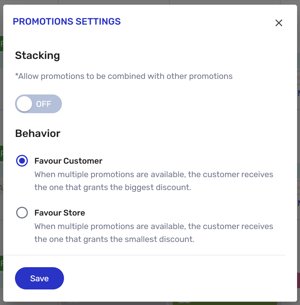
- [Getting started](https://helpcentre.breadstack.com/getting-started?hsLang=en-ca)
- [Online Store module](https://helpcentre.breadstack.com/online-store-module?hsLang=en-ca#main-content)
- [Promotions](https://helpcentre.breadstack.com/online-store-module?hsLang=en-ca#promotions)
- [Orders](https://helpcentre.breadstack.com/online-store-module?hsLang=en-ca#orders)
- [Products](https://helpcentre.breadstack.com/online-store-module?hsLang=en-ca#products)
- [Insights](https://helpcentre.breadstack.com/online-store-module?hsLang=en-ca#insights)
- [Service module](https://helpcentre.breadstack.com/service-module?hsLang=en-ca#main-content)
- [Service](https://helpcentre.breadstack.com/service-module?hsLang=en-ca#service)
- [Settings module](https://helpcentre.breadstack.com/settings-module?hsLang=en-ca#main-content)
- [Data](https://helpcentre.breadstack.com/settings-module?hsLang=en-ca#data)
- [Channels](https://helpcentre.breadstack.com/settings-module?hsLang=en-ca#channels)
- [Team](https://helpcentre.breadstack.com/settings-module?hsLang=en-ca#team)
- [Operation](https://helpcentre.breadstack.com/settings-module?hsLang=en-ca#operation)
- [Breadstack Delivery (CanFleet)](https://helpcentre.breadstack.com/breadstack-delivery-canfleet?hsLang=en-ca#main-content)
- [Breadstack Delivery module](https://helpcentre.breadstack.com/breadstack-delivery-canfleet?hsLang=en-ca#breadstack-delivery-module)
- [CanFleet Driver App](https://helpcentre.breadstack.com/breadstack-delivery-canfleet?hsLang=en-ca#canfleet-driver-app)
- [Breadstack OMS App](https://helpcentre.breadstack.com/breadstack-oms-app?hsLang=en-ca)
- [Integrations](https://helpcentre.breadstack.com/integrations?hsLang=en-ca#main-content)
- [Integrating a payment provider](https://helpcentre.breadstack.com/integrations?hsLang=en-ca#integrating-a-payment-provider)
- [Integrating a shipping or delivery partner](https://helpcentre.breadstack.com/integrations?hsLang=en-ca#integrating-a-shipping-or-delivery-partner)
- [Website editing guides](https://helpcentre.breadstack.com/website-editing-guides?hsLang=en-ca)
[](http://breadstack.com)
[mailto:email@email.com](mailto:email@email.com)
Copyright © 2026, Breadstack